A food scanner app for shopping in Japan
Milu helps you understand packaged food and drinks sold in Japan. Scan a barcode, read the available product information, and scan the label when more details are needed. You can use Milu in English, Japanese, French, Spanish or German.
By the Milu team · Updated
From a convenience store shelf to a clearer label
An onigiri before a train journey, a drink from the supermarket, a snack to take home: unfamiliar packaging can make a simple purchase take longer. Milu brings the available ingredients, additives and nutrition together in your language.
Start with the barcode on the item in your hand. Check the product name, flavour and pack size against the result. A barcode match does not remove the need to check the actual package.
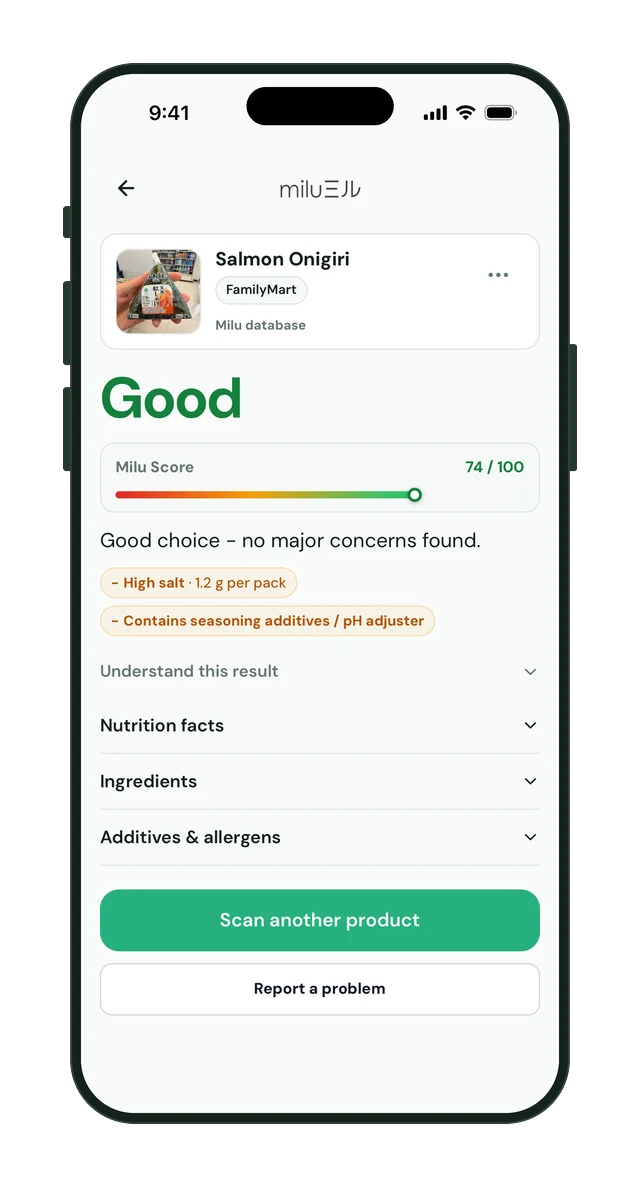
What a Milu product result looks like
First check that the product matches the one in your hand. Open the ingredients and nutrition details, then read the score explanation and any missing-data notice. This example shows the beta interface; the information available varies by product.
What happens when information is missing?
You may be asked to scan the ingredients or nutrition panel. Keep the full panel in view, avoid reflections and check that the text is sharp. A front-of-pack photo alone cannot supply the nutrition table.
Some items are absent from the database, and a label scan can fail or remain incomplete. Check the result against the package. Milu also keeps your scan history so you can revisit products.
Translation and an explanation
Milu is designed to explain the product information, not simply replace Japanese words with English words. When a score is available, read the supporting points and any data limitations alongside it.
If you already read Japanese, the same overview can help you inspect ingredients, additives and nutrition together. The Japanese interface is available throughout the current beta.
How to try the iPhone beta
Choose your language on the website and request access with your email address. Your email contains the TestFlight link and the Milu installation link. Install TestFlight first, then return to the email to install Milu.
The current beta covers food and drinks in Japan. Cosmetics and Milu Insights are not available. Milu is not an allergen certification service: check the original label and ask the manufacturer if you need clarification.